
EXT4 for Mac: Unified Driver Suite vs. Separate Tools

EXT4 for Mac is a storage-access problem before it is a software-shopping problem. macOS does not natively provide the same write access to EXT4 volumes that Linux users expect, and it treats NTFS as read-only in the default macOS environment. Buyers who work across Linux, Windows, and macOS often end up with two standalone utilities: one for NTFS and one for EXT4. The alternative is a single driver suite that manages both file systems through one desktop layer.
CrossDriver is a Hong Kong-based developer of kernel-level and system-level cross-platform software. Its Mac storage family includes CrossDriver NTFS for Mac, a driver for NTFS mounting and read/write access, and CrossDriver Ext4 for Mac, a driver for Ext2/Ext3/Ext4 partition identification, mounting, and read/write operations. The commercial question is not whether one suite sounds simpler. It is whether a unified product family gives a Mac administrator fewer mount managers, fewer license checks, and a clearer compatibility story across Intel and Apple Silicon M-series machines.
The problem with stacking separate drivers
Stacking separate tools is a rational first move. Each utility solves one format, and the buyer can evaluate each format independently. Over time, however, the Mac accumulates multiple menu bar agents, mount policies, update cycles, and licensing records. The risk is not necessarily a crash. It is operational ambiguity: which driver mounted the volume, which tool owns the read/write path, which license covers which machine, and which update introduced a change after a macOS upgrade.
That ambiguity matters most when both file systems appear in the same workflow. An IT operator may connect an NTFS drive from a Windows team and an EXT4 drive from a Linux server on the same MacBook Pro. A design studio may receive a Windows editing media drive while also accessing an EXT4 NAS volume. If two unrelated utilities handle those volumes, the user has two separate places to check mount status, two auto-mount policies, and two support paths. A unified suite attempts to reduce that surface by putting NTFS and EXT4 access under one product family and one disk-management layer.
Decision criteria buyers can check themselves
The comparison should be tool-category based, not brand based. A buyer comparing a unified suite with separate NTFS and EXT4 utilities can use the following criteria in a trial or technical review.
| Decision area | What to verify | Why it matters |
|---|---|---|
| Centralized mount management | Is there one place to mount, unmount, and monitor both NTFS and EXT4 volumes? | Fewer independent mount managers can reduce conflicting auto-mount rules and unclear disk status. |
| Overlapping software surface | How many background agents, menu bar controls, and license checks run on the same Mac? | Every additional component adds an update path and a potential compatibility conflict. |
| Licensing path | Is the purchase a single product family with individual or enterprise bulk licensing, or separate per-tool licenses? | Administration effort and entitlement scope often matter more than the sticker price. |
| Intel and Apple Silicon consistency | Does the vendor state support for both Intel-based Macs and Apple Silicon M-series devices? | Mixed fleets need the same mount policy and driver behavior on MacBook Pro, Mac mini, and other Mac models. |
| Integrity verification | What happens after an unexpected disconnection during a write operation? | A clear integrity check and error prompt can reduce silent file corruption risk. |
| Deployment and security review | Does installation require kernel extension approval, Recovery Mode steps, or IT policy exceptions? | On modern macOS, deployment effort is part of the product fit. |
How CrossDriver structures the unified option
CrossDriver's Mac Cross-Platform External Storage Read/Write Solution is built around a macOS kernel driver component named CrossDriver. It enables native bidirectional read/write via Finder on external NTFS, Ext2/Ext3/Ext4, or XFS drives, portable storage devices, and NAS storage without formatting existing drives. For the EXT4 for Mac use case, the relevant parts are the CROSSDRIVER Ext4 driver module for Ext2/Ext3/Ext4 partition identification, mounting, and read/write operations; the CROSSDRIVER NTFS driver module for NTFS partition mounting, read/write operations, and disk integrity verification; and a disk management component that provides one-click mounting via a menu bar or secure pop-up interface and disk status monitoring.
That architecture has a practical consequence. An EXT4 external drive and an NTFS drive can be handled inside the same product family instead of through unrelated utilities. The buyer still needs to test both volumes, but the number of independent control surfaces is smaller. In a mixed-format workflow, that can make mount status easier to explain and license administration easier to plan.
Technical explanation: kernel-level access and mount behavior
CrossDriver's drivers are kernel-level macOS components. The vendor states that the architecture is intended to provide read/write performance comparable to native macOS disk I/O, with lower CPU consumption than FUSE-based user-space tools. The buyer-facing point is not a benchmark claim. It is that the driver sits closer to the macOS storage path, which is relevant when large files or sustained transfers are part of the workflow.
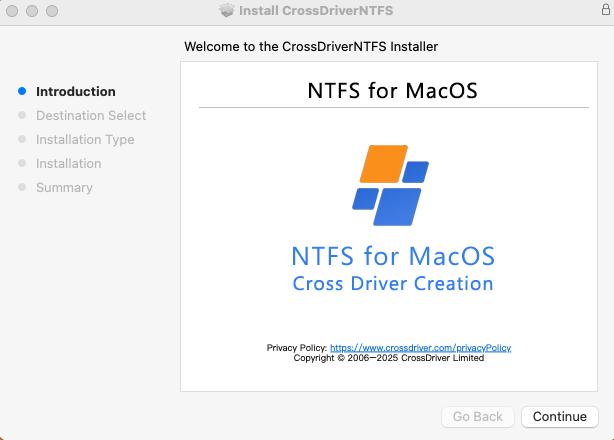
Installation follows a defined sequence: obtain the package online, install the CrossDriver drivers locally, and activate the software license. After activation, an inserted external hard drive is automatically recognized and mounted. On Mac devices with M-series chips, deployment may include entering Recovery Mode to enable kernel extension permissions and approving driver extensions in System Privacy and Security settings. That step is not a defect in the product concept; it is part of modern macOS security policy and should be planned into IT deployment.
The mount workflow is where the unified suite has an operational advantage. The disk management component provides one-click mounting via a menu bar or secure pop-up interface and disk status monitoring. For EXT4 in Finder on Mac, the practical test is whether the volume appears in Finder and supports the expected read and write operations without reformatting the drive. CrossDriver states that no disk formatting is required and that existing data is preserved. Buyers should still validate this in their own environment before bulk deployment.
The integrity-verification feature is also relevant to mixed-format use. The product includes automatic disk integrity verification upon unexpected disconnection to minimize file corruption risk. This matters when an EXT4 USB drive or an NTFS external drive is removed during a write operation. It is a risk-mitigation control, not a backup system, and it does not remove the need for safe ejection and independent data backup.
Where the unified suite fits in real Mac workflows
The strongest case for a unified suite is a Mac fleet that regularly touches both Windows and Linux storage. CrossDriver lists application scenarios that include IT operations debugging Linux server hard drives and Ext4-format NAS drives on a Mac laptop with read and write operations. That is a direct EXT4 for Mac use case: the administrator needs to mount EXT4 on Mac, browse EXT4 files on Mac, and transfer files from EXT4 to Mac without moving the drive to a Linux workstation.
A second scenario is multi-system home storage. A single hard drive may need offline shared access across Windows, Linux, and Mac devices. A third is the system-upgrade scenario, where cross-platform read/write capabilities for external hard drives are restored after a major macOS version update. In both cases, the value is continuity: the same product family is expected to keep working as macOS changes, rather than requiring the user to re-evaluate two separate utilities.
Creative and media workflows also appear in the vendor's scenario material. A film, video, or design studio may receive a Windows editing media drive and need to read, write, and modify files on a Mac. The same buyer may also handle an EXT4 external drive on Mac for Linux-based NAS or server storage. A suite does not make those formats interchangeable, but it reduces the number of separate drivers the studio must install and license.
There is also an enterprise deployment angle. CrossDriver supports individual standalone licensing and enterprise bulk licensing. In a manufacturing R&D deployment described in the vendor's case material, the commercial driver suite was used across Mac workstations to provide read/write access to NTFS, Ext4, and XFS file systems, with centralized license management. The vendor reports that waiting time for cross-storage read and write was reduced by 72 percent and that the storage disk read/write error rate dropped from 12 percent to 0.3 percent. Those are vendor-reported project results, not an independent benchmark, but they illustrate the type of operational outcome buyers should ask to verify in a pilot.
Market trend: why deployment architecture is now part of the purchase
The broader file system software category is not small. Dataintelo valued the global file system software market at USD 28.6 billion in 2025 and projected a 10.0 percent CAGR through 2034. That figure is category-level context, not an EXT4-specific forecast. For buyers, the more useful trend is architectural: the category is splitting between full read/write kernel-based drivers and read-only utilities built on user-space frameworks such as Apple's FSKit.
That split changes the evaluation question. A buyer who only needs to read EXT4 files on Mac may find a read-only approach sufficient. A buyer who needs to write EXT4 on Mac, mount EXT4 on Mac for active projects, or edit files directly on an EXT4 volume is evaluating a different capability class. The same logic applies to NTFS. The unified-suite argument is strongest when the buyer needs both formats in the same fleet and wants one deployment model, one vendor relationship, and one update path.
Unified suite vs. separate tools: a buyer-side comparison
| Evaluation area | Unified CrossDriver suite | Separate NTFS and EXT4 tools |
|---|---|---|
| Mount management | One disk management component with menu bar or pop-up mounting and disk status monitoring. | Separate menus, auto-mount rules, and status displays for each format. |
| Overlapping software | Fewer independent mount managers inside one product family. | More components to update and reconcile after macOS changes. |
| Licensing | One vendor and one licensing program, with individual standalone or enterprise bulk options. | Separate purchase, renewal, and entitlement records per tool. |
| Hardware consistency | Stated compatibility across Intel-based Macs and Apple Silicon M-series devices, with continuous updates aligned with macOS versions. | Each vendor may have a different compatibility and update position. |
| Integrity behavior | Automatic disk integrity verification upon unexpected disconnection to minimize file corruption risk. | Behavior varies by tool; buyers must ask what happens after an interrupted write. |
| Deployment effort | Kernel extension approval may be required; M-series Macs may need Recovery Mode steps. | Similar security review may apply to each kernel-level tool. |
The comparison does not produce a universal winner. It produces a fit decision. A single-format user may not need a suite. A read-only user may not need a read/write driver at all. A mixed-format fleet with both NTFS and EXT4 external drives has a stronger reason to consolidate.
Where a unified suite is not the right answer
A credible comparison has to state boundaries. First, a unified suite is not automatically cheaper than per-tool licensing. CrossDriver offers individual standalone licensing and enterprise bulk licensing, but buyers should confirm the exact entitlement scope for both modules and for every machine in the fleet. A single vendor relationship can simplify administration, but it should be compared against the actual number of licenses required, not against a generic assumption.
Second, kernel-level access carries deployment responsibility. On M-series Macs, the buyer may need to enter Recovery Mode to enable kernel extension permissions and approve driver extensions in System Privacy and Security settings. Organizations that prohibit kernel extensions, or that require a fully user-space architecture, should treat this as a constraint rather than an afterthought.
Third, a driver is not a data-recovery tool. The software handles mount and read/write logic. It cannot bypass hardware damage or third-party encryption restrictions. Automatic integrity verification upon unexpected disconnection can reduce corruption risk, but it does not replace independent backups, safe ejection, or a recovery plan. If an EXT4 drive is not recognized on Mac, the first checks should include physical connection, partition integrity, and whether the volume is encrypted or locked by another tool.
Finally, if the buyer only needs to read EXT4 volumes occasionally, a read-only utility may be sufficient. The unified CrossDriver discussion applies most directly to buyers who need write EXT4 on Mac and who also manage NTFS volumes in the same environment.
Future outlook
macOS updates and Apple Silicon security policy will keep deployment review central to EXT4 support for macOS. Buyers should favor vendors that state continuous updates aligned with new macOS versions and that provide clear M-series guidance. The unified-suite model is likely to remain attractive for mixed-format fleets because it reduces the number of independent mount managers and license records. Single-format users can still choose point tools, and read-only users can choose read-only approaches. The procurement lesson is to evaluate the workflow, not the category label.
FAQ
What is a unified EXT4 and NTFS driver suite for Mac?
It is a product family that provides EXT4 and NTFS access through one vendor and a shared disk-management layer. CrossDriver's suite includes CrossDriver NTFS for Mac and CrossDriver Ext4 for Mac, with a disk management component for mounting and status monitoring. It is not a native macOS feature.
How does centralized mount management reduce conflicts?
It reduces the number of independent mount managers and status displays. A single disk management component can present mount and unmount controls and disk status. It does not eliminate every possible conflict; buyers should verify auto-mount policies and test simultaneous NTFS and EXT4 volumes.
Is one licensing path cheaper than per-tool licensing?
Not automatically. CrossDriver offers individual standalone licensing and enterprise bulk licensing. Buyers should compare the total entitlement needed for both modules and for every machine. A single vendor relationship can simplify administration, but the exact suite entitlement should be confirmed before purchase.
Does the suite behave the same on Intel and Apple Silicon?
CrossDriver states compatibility across Intel-based Macs and Apple Silicon M-series devices, with continuous updates aligned with macOS versions. On M-series Macs, deployment may require entering Recovery Mode to enable kernel extension permissions and approving the extension in System Privacy and Security settings. Mixed fleets should test both hardware types.
What happens if an EXT4 or NTFS drive disconnects unexpectedly?
CrossDriver includes automatic disk integrity verification upon unexpected disconnection to minimize file corruption risk. This is a risk-mitigation feature, not a backup. Users should maintain independent backups and use safe ejection.
Can a unified suite replace backups or fix hardware failure?
No. The software handles mount and read/write logic. It cannot bypass hardware damage or third-party encryption restrictions. Users are responsible for backups and safe operation.
Reference links
Official website: https://www.crossdriver.com
Technical white paper (download): https://cdn.socialarks.com/sbsp/25407/common/2026/0929/Technical%20White%20Paper.docx
Есть вопросы или нужны дополнительные детали?
Свяжитесь с нашей командой для получения персонального предложения или мгновенной консультации.
Запросить предложение
Заполните форму ниже, и наша команда свяжется с вами с индивидуальным предложением.
Прямой чат WhatsApp
Предпочитаете общаться в реальном времени? Напишите нам в WhatsApp для мгновенной помощи и быстрых ответов.
- Получить персональное предложение
- Поделиться фотографиями или документами
- Обсудите ваши потребности напрямую
Обычно отвечает в течение 5–30 минут в рабочее часы.