
Live Streaming Cameras for Education and Medical Training
Live Streaming Cameras for Education and Medical Training
Education and medical training have become two of the most demanding indoor environments for live streaming cameras. In a lecture hall or a clinical skills lab, the camera is no longer a production accessory bolted on for a single event — it is the capture layer behind recorded lectures, remote teaching, demonstration review and supervised practice. It typically runs continuously, captures subjects who move, and must keep fine detail legible for people watching on a screen rather than standing in the room.
The practical consequence is that the specification questions change. Instead of asking which camera produces the most attractive image, education and healthcare buyers ask which camera survives a fixed indoor installation, which one can be reached over the building's existing cabling, and which one keeps working through a long teaching day. This reference examines those questions against documented deployment conditions — an indoor operating envelope of −10 °C to +50 °C and 20 % to 80 % relative humidity, 24/7 operation, and connection through HDMI, SDI and power adapters — and against specific models such as the TCHD-T3, TC420 and TC-980S from TCHD Video.
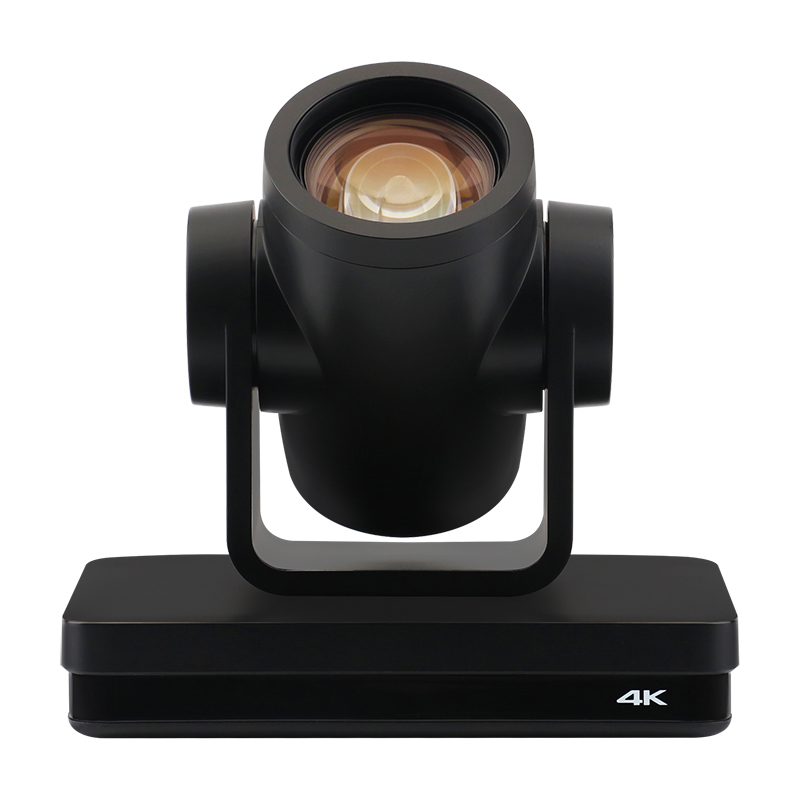
PTZ live streaming cameras are specified for fixed indoor installation in teaching rooms, where continuous capture and remote viewing replace single-event production.
Why teaching video is harder than event video
Event streaming has a start and an end. Teaching video does not. A classroom camera may be scheduled for every lecture of a semester, and a medical training camera may be running while a demonstration is performed, reviewed and repeated. That difference pushes several requirements to the front of the buying decision.
- Detail legibility. In medical training, the useful information is often a hand position, an instrument angle or a small piece of equipment on a table. Optical zoom and a low minimum illumination matter more than a wide, cinematic field of view.
- Continuous duty. The documented operating mode for these education and medical teaching scenarios is 24/7, which turns power consumption, thermal behaviour and mount stability into selection criteria rather than afterthoughts.
- Unobtrusive movement. A camera that must be repositioned by hand during a demonstration disrupts the room. Silent pan-tilt-zoom movement, preset recall or automatic tracking keeps the session undisturbed.
- Two destinations at once. The same signal frequently has to feed an in-room display for students present, and a network stream for remote participants or an archive. HDMI or SDI output and IP streaming are therefore used together, not as alternatives.
- Existing building infrastructure. Teaching rooms are usually retrofitted, so the camera has to fit the cable routes, power points and control systems that already exist in the ceiling.
| Teaching requirement | What it changes in camera selection |
|---|---|
| Close-up of instruments or hand skills | Optical zoom range, minimum illumination, focus behaviour |
| Instructor moving during the session | PTZ movement, preset recall, or automatic tracking on tracking-capable models |
| Remote learners and recorded archives | Network streaming protocols such as RTSP, RTMP, SRT and ONVIF support |
| In-room display for present students | HDMI or SDI output on the camera itself |
| Long teaching days | Stated power consumption and continuous operation profile |
| Retrofit installation | Choice between HDMI, SDI and USB signal paths, plus PoE availability |
The indoor operating envelope: −10 °C to +50 °C and 20 % to 80 % RH
For the education and medical teaching scenarios documented for these cameras, the stated working temperature range is −10 °C to +50 °C and the stated working humidity range is 20 % to 80 %, with an explicit indoor requirement and 24/7 operation. Those two numbers are worth reading carefully, because they describe where the camera is expected to survive — not how rugged it is.
The upper bound of +50 °C is well above a normal climate-controlled classroom and matters mainly for ceiling voids, equipment cupboards and unventilated rooms where heat accumulates above head height. The lower bound of −10 °C is relevant for unheated campus buildings, sports halls and clinics in cold-winter regions. The humidity band is the constraint that is most often overlooked: a heated lecture theatre in winter can sit below 20 % relative humidity, while a wet or poorly ventilated utility space in a hospital complex can exceed 80 %. Both sit outside the stated envelope.
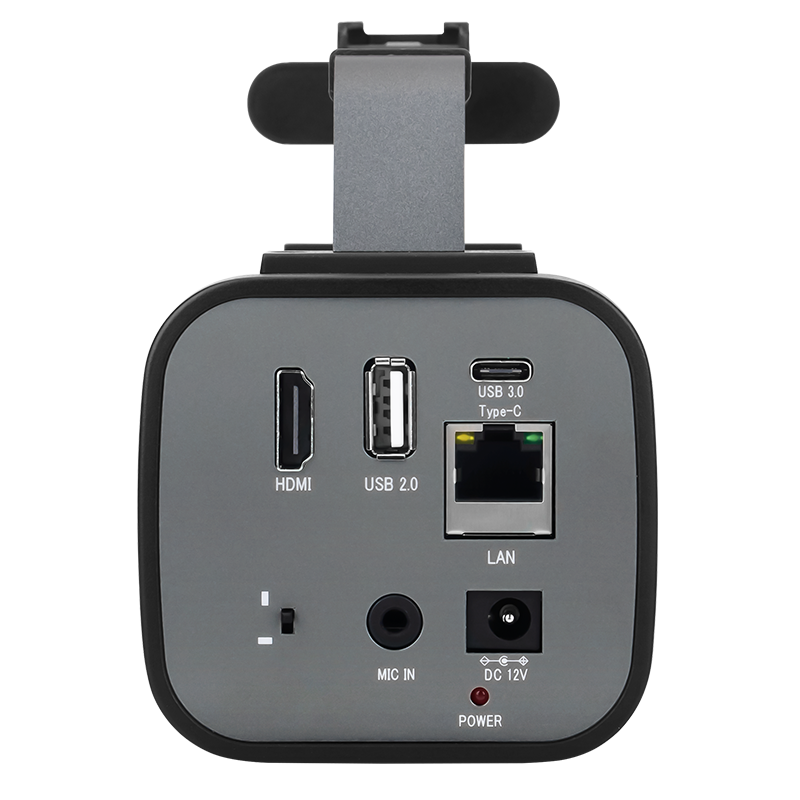
Indoor installation planning: camera, HDMI or SDI cable route, power adapter and network drop are specified together before the room is signed off.
| Parameter | Stated value | Practical implication |
|---|---|---|
| Environment | Indoor | Not specified for outdoor, wet or washdown locations |
| Working temperature | −10 °C to +50 °C | Covers climate-controlled rooms and unheated buildings in cold seasons |
| Working humidity | 20 % to 80 % | Very dry winter rooms and damp service areas fall outside the range |
| Operation mode | 24/7 | Camera is treated as continuous infrastructure, not event equipment |
| Matched equipment | HDMI cable, SDI cable, power adapter | Cabling and power are part of the specification, not an accessory afterthought |
| Function | Stream video to streaming server platforms | Network streaming is the primary output path for remote learners |
Model fit: TCHD-T3, TC420 and TC-980S
Within the TCHD Video range, three models are documented for education and medical teaching use. They differ in resolution ceiling, signal outputs and whether tracking is available, which is exactly where a room-by-room decision usually lands.
| Model | Documented categories | Image and zoom | Video output | Power |
|---|---|---|---|---|
| TCHD-T3 | Education teaching camera, e-commerce streaming camera, medical training camera | 1/2.8" CMOS, 2.07 M effective pixels, up to 1080P@60; 12× optical, 16× digital zoom | 1× HDMI 1.4b; USB 3.0 Type-C and USB 2.0 Type-A; RJ45 10/100M with PoE | DC IN 12 V (JEITA type), power consumption below 12 W |
| TC420 | Video conference camera, PTZ camera, education camera, medical training camera | 1/2.8" CMOS, 8.29 M effective pixels, HDMI up to 4KP30; 12× optical, 15× digital zoom | HDMI, SDI (up to 1080P60), LAN with PoE, USB 3.0 | DC 12 V via HEC3800 socket; adapter input AC110 V–AC220 V, output DC12 V/2.5 A; consumption below 12 W |
| TC-980S | PTZ camera, education training camera, medical teaching camera, video conference camera, event streaming camera | 1/2.8" CMOS, 8.42 M effective pixels, HDMI up to 3840×2160; 12×/20×/30× optical variants, 16× digital | HDMI, SDI, USB 3.0, 1000M LAN with PoE+ | DC 12 V; adapter input AC110 V–AC220 V, output DC12 V/1.5 A; total consumption ≤18 W |
TCHD-T3: the fixed-output teaching camera
The TCHD-T3 is positioned as an education teaching camera and medical training camera. It delivers 1080P at up to 60 fps alongside 1080i and 720P options, uses a 1/2.8" CMOS sensor with 2.07 M effective pixels, and pairs a 12× optical zoom lens with 16× digital zoom. Horizontal angle of view ranges from 72.5° to 6.9°, and the camera holds 255 presets. Video compression covers H.264, H.265 and MJPEG with a bit rate span of 32 Kbps to 20480 Kbps, and audio is carried as AAC over the USB path. Supported protocols include TCP/IP, HTTP, RTSP, RTMP, ONVIF, DHCP and Multicast, and the RJ45 port is 10M/100M adaptive with PoE. Control is available through VISCA, Pelco-D or Pelco-P over RS232 or RS422. Power consumption is under 12 W.
For a lecture room that already has an HDMI path to a recorder, the TCHD-T3 is a straightforward fit: one HDMI 1.4b output, one network drop for the stream, one power adapter. Its ceiling is resolution — 1080P rather than 4K — which is usually sufficient for lecture capture but may not satisfy departments that want 4K masters for archive.
TC420: the PTZ bridge between conference and clinical rooms
The TC420 is documented under four categories at once: video conference camera, PTZ camera, education camera and medical training camera. It carries a 1/2.8" CMOS sensor with 8.29 M effective pixels, 12× optical and 15× digital zoom, and a horizontal field of view from 6.5° to 70.9°, which supports both wide room framing and tight close-ups of a demonstration table. Minimum illumination is 0.5 Lux at F1.8 with AGC on, and the signal-to-noise ratio is above 50 dB.
Its interface set is the reason it suits retrofit teaching buildings: HDMI up to 4KP30, SDI up to 1080P60, LAN with PoE, USB 3.0, a 3.5 mm audio line input, RS232 in and out, and RS422 compatible with RS485. Network protocols include RTSP, RTMP, ONVIF, GB/T28181, VISCA over IP and SRT, with remote upgrade, reboot and reset supported. Pan range is −170° to +170° and tilt range is −30° to +90°, with up to 255 presets. Power draw stays below 12 W, and the supplied adapter accepts AC110 V–AC220 V input — convenient for institutions standardising across regions.
TC-980S: 4K and automatic tracking for larger rooms
The TC-980S is a PTZ camera listed for education training, medical teaching, video conferencing and event streaming. It is available with 12×, 20× or 30× optical zoom, outputs HDMI up to 3840×2160 as well as SDI at 1080P, and offers USB 3.0 and a 1000M LAN port with PoE+. Its distinguishing feature for teaching use is monocular tracking, with selectable modes — Off, Real-time Tracking, Stage Tracking, Area Tracking and Intelligent Framing — and a maximum tracking distance of up to 18 metres. Total power consumption is ≤18 W, and the unit supports up to 255 presets, SRT streaming, and optional NDI and Dante AV.
In a tiered lecture theatre or a demonstration room where the presenter walks between a screen, a bench and a specimen table, that tracking capability replaces a second operator. In a fixed skills lab where the instructor stays at one workstation, the same budget may be better spent on optical zoom and cabling.
Connectivity: HDMI, SDI, USB and the power adapter
The documented equipment set for these scenarios — HDMI cable, SDI cable and power adapter — reflects how teaching rooms are actually cabled. The signal path is rarely a single connector type, because a camera usually needs to reach both a local display or recorder and a streaming server.
| Signal path | Typical role in a teaching room | What to verify |
|---|---|---|
| HDMI | Direct connection to a recorder, switcher or in-room display; baseband and low-latency | Version and resolution ceiling — 1.4b on TCHD-T3, up to 4KP30 on TC420, up to 3840×2160 on TC-980S |
| SDI | Longer in-building cable runs to a control room or rack, common in clinical and broadcast-adjacent spaces | That the chosen model provides SDI at all; TCHD-T3 does not list an SDI output |
| LAN / PoE | Streaming to a server or platform, remote control and remote firmware tasks | Protocol support (RTSP, RTMP, SRT, ONVIF) and whether PoE or PoE+ is available |
| USB | Plug-and-play capture into a lecture-capture PC or conferencing application | UVC/UAC support and whether USB is the only output, which changes cabling distance limits |
| Power adapter | Stable DC supply for a camera mounted out of reach | Input range — AC110 V to AC220 V on the TC420 and TC-980S adapters — and the correct DC output |
One boundary is worth stating plainly. Not every model in the range offers broadcast-style outputs: the TCHD-X5 PTZ 4K webcam and the TCHD-X6 live streaming camera deliver video through a USB Type-C 3.0 interface and do not provide HDMI or SDI output. They are documented for e-commerce streaming, education teaching and remote teaching, and for the X5 the device is powered through the same USB Type-C interface. If a teaching building's standard is an SDI backbone to a rack, those USB-first models are not candidates regardless of image quality — the cabling architecture decides the shortlist before the sensor does.
AI auto tracking, presets and operator-free sessions
Automatic tracking is the feature most often requested in hybrid teaching and clinical demonstration rooms, and it is also the feature most often assumed to be universal. It is not. On the TC-980S, monocular tracking supports Off, Real-time Tracking, Stage Tracking, Area Tracking and Intelligent Framing, with tracking distance up to 18 metres. That is enough for a presenter to move across a teaching stage while the camera keeps the framing.
On the TCHD-T3 and TC420, the operator-free workflow is built on presets instead: up to 255 preset positions, of which 10 can be recalled from the remote control, combined with auto or one-push focus and, on the TC420, auto and manual exposure modes. A teaching team that wants to switch between a wide room shot, the lectern and a bench close-up can do so reliably from a control panel — but the transitions are scripted rather than automatic. This is a genuine trade-off: tracking models reduce operator load in unpredictable sessions, while preset-driven models give more repeatable, predictable framing when the session structure is fixed.
Application profiles in education and medical teaching
The documented scenario set behind these cameras covers education lecture capture and medical teaching as distinct project types, alongside event streaming, corporate meetings and outdoor or sports use. The education and medical applications share the indoor, 24/7, HDMI/SDI/power-adapter profile; they differ in how much optical zoom and light sensitivity the room demands.
| Application | Capture need | Selection logic |
|---|---|---|
| University lecture capture and MOOC recording | Continuous recording of a fixed stage with occasional close-ups | TCHD-T3 or TC420, HDMI to recorder plus LAN streaming |
| Remote and hybrid teaching | Low-latency stream to a platform with in-room display | TC420 or TCHD-T3, with RTMP/SRT/ONVIF support and PoE for single-cable installation |
| Clinical skills laboratory | Tight close-ups of hand positions and instruments under moderate light | TC420 or TC-980S, using optical zoom and 0.5 Lux minimum illumination |
| Surgical and procedural demonstration | Fine detail for remote learners, often routed through a rack | TC-980S for 4K HDMI plus SDI, alongside the medical video recorders and surgical teaching hosts listed in the same product range |
| Simulation debrief and review | Recorded sessions reviewed afterwards | Any of the three models; SDI or LAN to a recording host |
Deployment profile: what a 20-unit teaching rollout changes
Education rollouts of this type have reached 20 units in a single teaching deployment, with the United States among the markets where these indoor education and medical teaching scenarios have been documented, alongside the United Kingdom, Australia, Spain, France, the Netherlands, China and South Korea. At one or two cameras, the purchase is an equipment decision. At twenty, it becomes a configuration decision: every room needs the same preset naming, the same cable kit, the same mounting height relative to the demonstration surface, and the same firmware baseline so that a technician moving between rooms sees a familiar interface.
Three planning questions tend to dominate at that scale. First, does every room need tracking, or only the large demonstration halls? Second, is the standard signal path HDMI, SDI or LAN, and can every selected model actually provide it? Third, what spare ratio and spare-parts arrangement keeps a 24/7 teaching schedule intact when one unit is removed for service? None of these questions appears on a specification sheet, and all three determine whether the deployment still works in its third year.
Market context: a category growing against a definition problem
The global live streaming camera market was projected at USD 3.35 billion in 2025 and is forecast to grow at a CAGR of 8.8 % to reach USD 7.79 billion by 2035, according to an industry report surfaced through Vertex AI Search. Within the conference camera segment, PTZ cameras are estimated to account for 38.5 % of global revenue in 2025, based on figures published by Metastat Insights. Video conferencing hardware — the category that includes cameras — represented 46 % of total video conferencing market revenue in 2024, according to Grand View Research. On the supply side, IndexBox reports that China produced 749 million television and digital cameras in 2024, valued at approximately USD 16.5 billion.
One caution applies to all segment-level growth figures. Published CAGRs for the PTZ category differ substantially between research firms depending on how each defines the boundary between PTZ cameras, conference cameras and live streaming cameras, with figures ranging from single-digit to double-digit growth over overlapping periods. Buyers building multi-year budgets should treat any single growth rate as definition-dependent rather than as a settled market fact.
Compared with traditional capture approaches
Teaching institutions frequently arrive at a PTZ live streaming camera after starting with something else — a camcorder on a tripod, a fixed box camera, or a general-purpose webcam. Each has a defensible use case, and each reaches a limit in a teaching room.
| Approach | Strength | Limit in teaching and clinical rooms |
|---|---|---|
| Camcorder on a tripod | High image quality; familiar to AV staff | Requires an operator or repeated manual adjustment; no remote control path; single output |
| Fixed box camera | Simple, low cost, stable framing | No zoom for close-ups; no preset recall; framing fixed at installation |
| General-purpose USB webcam | Low cost, plug-and-play into a PC | USB-only signal path limits cable distance and prevents integration with SDI or rack infrastructure |
| PTZ live streaming camera (TCHD-T3, TC420, TC-980S) | Remote control, presets, optical zoom, simultaneous HDMI/SDI/LAN/USB output paths on higher models | Requires network and control planning; mechanical pan-tilt needs maintenance attention; resolution and tracking vary by model |
The clearest limitations sit inside the PTZ category itself and should be checked model by model. Resolution is not uniform: the TCHD-T3 tops out at 1080P, while the TC420 and TC-980S offer higher HDMI resolutions. Tracking is not uniform: only the TC-980S documents monocular tracking modes, so a room that genuinely needs operator-free following must be specified with a tracking-capable model. Output types are not uniform: the TCHD-X5 and TCHD-X6 are USB-output devices without HDMI or SDI. And preset capacity differs in practice from preset capacity on paper — 255 presets are available on camera, but only 10 are reachable from the supplied remote control.
Future outlook
Three directions look most consequential for education and medical training capture. The first is the steady migration of teaching rooms toward IP-native signal paths, where SRT, RTMP and ONVIF support determines whether a camera can be integrated without additional conversion hardware. The second is 4K capture becoming routine rather than specialist, which raises storage and network requirements more than it raises camera requirements. The third is automatic framing and tracking, which moves the camera from a device an operator points to a device that follows a session — a meaningful change for departments that cannot staff every teaching room.
For buyers, the practical implication is to specify for the signal path and the operating envelope first, then for resolution and tracking. A camera that matches the building's cabling, sits inside the −10 °C to +50 °C and 20 % to 80 % indoor envelope, and runs continuously will still be in service when imaging trends have moved on.
FAQ
What does a live streaming camera actually do in a classroom or training room?
A live streaming camera captures video from a fixed indoor position and delivers it to two kinds of destination at once: a local output such as HDMI or SDI for an in-room display, recorder or switcher, and a network stream to a streaming server platform for remote learners or archiving. In education and medical teaching scenarios, the documented operating mode is 24/7, with the camera connected through HDMI cable, SDI cable and a power adapter. Models such as the TCHD-T3, TC420 and TC-980S are documented for education teaching and medical training categories.
Can the same camera model serve both general education and medical training?
In several cases, yes. The TC420 is listed under video conference camera, PTZ camera, education camera and medical training camera categories; the TCHD-T3 is listed as an education teaching camera, e-commerce streaming camera and medical training camera; and the TC-980S is listed for education training and medical teaching. The camera selection can therefore be shared, but medical environments add a compliance question that is independent of the model: medical electrical equipment, including surgical cameras, is expected to comply with the IEC 60601-1 series. Buyers should confirm intended use and applicable standards rather than assuming that a camera used in a training room is a certified medical device.
What temperature and humidity range should an indoor teaching camera be specified for?
The documented range for these indoor education and medical teaching deployments is −10 °C to +50 °C working temperature and 20 % to 80 % working humidity, with an explicit indoor requirement and 24/7 operation. The upper temperature bound is relevant for ceiling voids and unventilated rooms where heat accumulates; the lower bound for unheated buildings in cold seasons; and the humidity band matters because very dry heated rooms and damp service areas can fall outside it. The range describes indoor operation and should not be read as an outdoor or washdown rating.
Should a training room use HDMI, SDI or USB to connect the camera?
It depends on what the room already has. HDMI is the common choice for connecting directly to a recorder, switcher or display; the TCHD-T3 provides HDMI 1.4b, the TC420 up to 4KP30 HDMI, and the TC-980S up to 3840×2160 HDMI. SDI is used where the signal has to travel to a rack or control room, and is available on the TC420 (up to 1080P60) and TC-980S, but is not listed on the TCHD-T3. USB is convenient for plug-and-play connection to a teaching PC, but models such as the TCHD-X5 and TCHD-X6 are USB-output devices without HDMI or SDI, which restricts integration with rack-based installations.
How does automatic tracking work when there is no camera operator?
On the TC-980S, monocular tracking provides selectable modes — Off, Real-time Tracking, Stage Tracking, Area Tracking and Intelligent Framing — and follows a subject at a maximum distance of up to 18 metres, so a presenter can move while remaining framed. Tracking is model-specific rather than universal: the TCHD-T3 and TC420 rely on preset positions instead, with up to 255 presets stored on the camera and 10 recallable from the remote control. Rooms with unpredictable movement generally need a tracking-capable model; rooms with a fixed session structure can be served reliably by preset recall.
What changes when a teaching deployment scales to roughly 20 cameras?
Standardisation becomes the main risk. A deployment of this scale, as documented in a 20-unit teaching installation with the United States among the applicable markets, depends on consistent preset naming, a uniform cable kit of HDMI and SDI cables plus power adapters, a common firmware baseline, and a defined spare-parts arrangement so that a 24/7 teaching schedule survives one unit being removed for service. Buyers should also decide in advance which rooms genuinely require tracking and which can operate on presets, since applying a tracking-capable model to every room raises cost without changing the teaching outcome in fixed-framing spaces.
TCHD Digital Video Technology Development (Beijing) Ltd., established in 2005, manufactures live streaming cameras, video capture cards, video converters, video encoders and video switchers, with a 10,000 m² facility, approximately 50 staff, an R&D team of 10 engineers and an annual production capacity of 4,000 units. Detailed model specifications and interface tables are compiled in the TCHD product catalog.