
OPS-C vs Desktop PC: What OPS PC Buyers Should Know
Buyer Reference
A display project often forces buyers to choose between a familiar desktop computer placed beside a screen and an OPS-C pluggable module that slots into the display itself. For interactive flat panels, whiteboards, digital signage and meeting displays, that choice affects installation, cabling, service workflows and long-term upgrade planning.
Why display projects are not ordinary PC fleet procurement
Traditional PC procurement starts with a computer: operating system, CPU generation, RAM, storage and IT management. Display procurement starts with a location: classroom, meeting room, lobby or retail aisle. In display installations, the computer is usually a secondary consideration until the panel is already selected. That sequence creates a practical question: should the installation use an external desktop PC, or should the display carry its own slot-in module following the OPS or OPS-C form factor?
The term OPS PC refers to computers built for that slot-based display ecosystem. In its most general sense, an OPS PC is not a standalone tower. It is a compact compute module that follows the Intel Open Pluggable Specification or one of its display-market variants. The OPS-C computer module is one of those variants, designed for slot-in installation into flat panel displays. Shenzhen Aiostar Electronics Co., Ltd., for example, builds OPS-C pluggable modules under the AIOSTAR brand, alongside Android OPS PCs and industrial motherboards.
For buyers in the awareness or research phase, the important distinction is mechanical architecture. A desktop PC usually sits beside or below the display. An OPS-C module rides in a slot on the display enclosure, sharing the panel's structure and standardised interface.
OPS and OPS-C: what the names actually mean
Intel's Open Pluggable Specification standardised the interface between compatible displays and media players. The original OPS form factor uses a unified 80-pin JAE connector with a mechanical footprint of 180 mm x 119 mm x 30 mm. A compatible display contains a slot that accepts the module, which is then locked into the panel rather than connected by external cables.
OPS-C is a variant widely adopted in the Chinese domestic market, especially for educational interactive whiteboards. Its typical dimensions are around 180.8 mm x 195.2 mm x 42.5 mm, which differ from the original Intel OPS mechanical profile. Buyers should therefore not assume that a display labelled OPS will automatically accept an OPS-C module. Mechanical size and connector pinout need to be verified against the display specification before quoting or mass production.
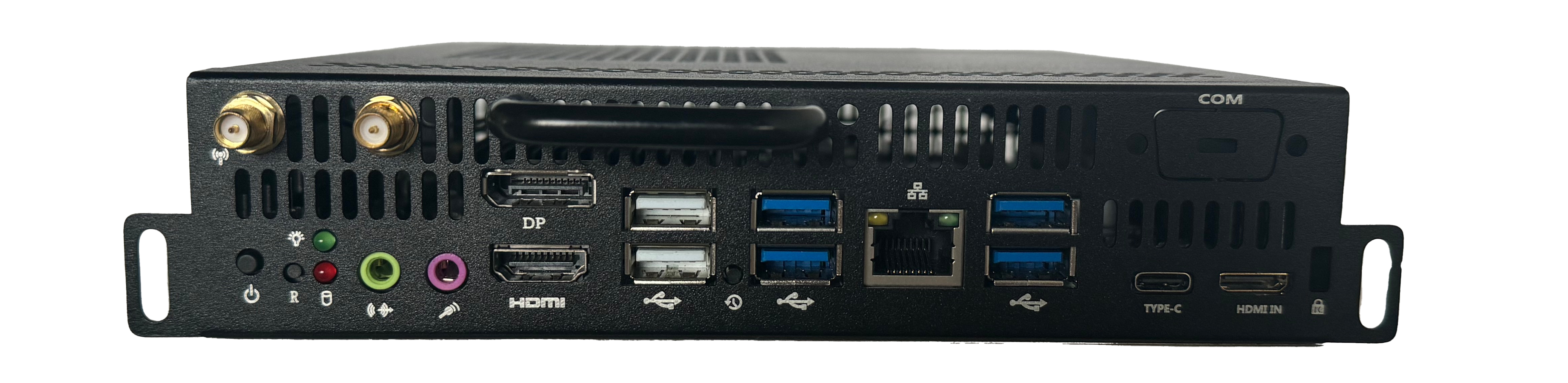
From a buyer's perspective, the OPS-C category is attractive because it preserves the core value of the OPS approach: the computer is removable from the display without breaking the panel assembly open or removing the entire screen from its mounting. AIOSTAR lists the AOS-SOHAUF41SC, an Intel Alder Lake-U based OPS-C pluggable module, as installed via OPS-C slot-in and designed for interactive flat panels. It supports configurable I/O, SO-DIMM memory and M.2 SSD, with CPU options including Intel Core i5-1235U and i5-1240P.
What the OPS-C form factor changes for buyers
The practical difference between a desktop PC and an OPS-C module appears in four areas: installation location, cable logic, service access and replacement strategy.
A desktop PC used with a display needs floor, shelf or tray space. It also needs its own power connection and signal paths to the panel, often via HDMI or DisplayPort, plus USB cables for touch and accessories. When the display is wall-mounted or integrated into a meeting table, routing those cables cleanly becomes a project cost. An OPS-C module avoids much of that external cable routing because it connects through the display's internal slot. The module is supplied with power and video signals through the slot interface, reducing the number of cables that link a separate PC box to a screen.
The removable design also changes service behaviour. With a desktop PC, a failure or upgrade is handled as a PC event: an engineer may need to access a separate box, replace components or swap the unit. With an OPS-C module, the compute element can typically be removed from the display slot while the panel stays in place. For a classroom whiteboard or a lobby display, that can mean faster replacement without unmounting the display or rewiring the whole installation.
Cable reduction statistics vary by installation because a single-screen desktop deployment and a large networked video wall have very different cable volumes. The structural benefit, however, is clear: the principal display-to-computer connection moves from a bundle of external cables to a standardised slot connector. Buyers evaluating signage or interactive display projects should treat this as the main cable-management advantage of the OPS-C route.
Desktop PC as a display compute option: what remains attractive
It would be misleading to describe desktop PCs as obsolete for display projects. Desktop PCs still make sense when buyers already own standardised hardware, when IT staff are trained to service them, or when the compute task is unrelated to the display and needs to be upgraded independently.
The relevant strengths of a desktop PC are extension and power headroom. Desktop towers generally have more physical space for storage drives, expansion cards, additional USB controllers and larger cooling solutions. For specialised visualization or rendering work, a full-size desktop may also support graphics configurations that are difficult to fit inside a compact OPS enclosure.
Desktop PCs also give buyers flexibility if they want to replace the computer without replacing or modifying the display. If a project uses a monitor without an OPS slot, a desktop PC, mini PC or BOX PC is often the simplest route. The decision is therefore not always about performance. It is about whether the project wants the computer to be integrated into the display lifecycle or managed as a separate external asset.
OPS-C module versus desktop PC: side-by-side view
| Comparison point | OPS-C module example | Traditional desktop PC | Buyer relevance |
|---|---|---|---|
| Installation model | OPS-C slot-in installation inside a compatible display | External box placed on a shelf, tray or under a desk | OPS-C simplifies the display installation but requires a display with a matching slot |
| Cable path | Power and signal handled through the slot connection | Separate power cable, video cable and touch or data cables | OPS-C reduces cable clutter around the display area |
| Physical space | Compact module inside the display envelope | Dedicated PC enclosure consumes extra space | OPS-C saves space near the display, which matters in wall-mounted and mobile installations |
| Service and swap | Removable module can be taken out for service or replacement | Service means working on the external PC unit | OPS-C makes field replacement of the compute element more practical |
| Configuration range | Memory, storage, I/O and OS are configurable by project; some models add discrete graphics | Desktop PCs usually offer a wide range of CPU, GPU, storage and expansion options | Desktop PCs remain more flexible at the upper performance range |
| Power and cooling boundary | Enclosure and display slot set a compact thermal envelope | Larger chassis with more airflow options | Buyers needing extreme CPU or GPU power should evaluate desktop or external compute first |
The table does not compare a specific desktop brand or model. Instead, it identifies the structural differences that matter in display procurement. Buyers can use those differences as a checklist when selecting between an OPS-C module and a separate PC.
Internal evidence: what a supplier catalogue shows
To make the OPS-C category concrete, it helps to examine how one OPS module supplier describes its own products. AIOSTAR is a Shenzhen-based computer hardware supplier established in 2015. The company develops and manufactures OPS PCs, OPS-C pluggable computer modules, Android OPS PCs, industrial motherboards, mini PCs, BOX PCs, industrial panel PCs, servers and customised embedded computing systems. AIOSTAR operates a 1500 m² manufacturing facility with about 50 staff and an R&D team of eight engineers, with annual production capacity above 170,000 units.
The AOS-SOHAUF41SC model illustrates the Intel-based OPS-C path. It is an Intel Alder Lake-U based module with configurable SO-DIMM memory and M.2 SSD. It also supports Wake-on-LAN, auto power-on and watchdog functions through BIOS configuration. For a classroom or corporate meeting display, those functions allow scheduled start-up and unattended operation. Windows or Linux availability depends on configuration, and project-level OEM and ODM support is available.
The same supplier catalogue shows that OPS computing is not limited to Windows and x86. The AOS-SOR358464H is an Android AI OPS Computer powered by a Rockchip RK3588 octa-core processor up to 2.4 GHz. It integrates a 6 TOPS NPU for edge AI acceleration, runs Android 13, Ubuntu or Debian, and supports up to 8K multimedia output depending on firmware and interface configuration. That matters for digital signage and retail displays where media playback, scheduling and occasional AI tasks are more relevant than Windows compatibility.
For projects that demand desktop-class graphics capability, AIOSTAR also offers the AOS-SOH61I41SXG, an Intel H610-based OPS computer supporting selected 12th and 13th Gen Intel Core i3, i5 and i7 processors. It provides HDMI, HDMI and DisplayPort outputs with up to 8K at 60 Hz, subject to CPU, GPU and display configuration. Optional discrete graphics are available by project, making it possible to run GPU-assisted workloads inside a slot-in module for video walls and visualisation systems.
Finally, the AOS-SOZK6A341SXG belongs to the Zhaoxin KX-6780 series OPS-C PC category, supporting domestic-platform processors such as KX-U6780A, KX-U6740A, KX-U6640A and KX-U6640MA. It offers six USB ports, including two USB 3.0 ports, and optional graphics in selected configurations. This model is aimed at domestic-platform interactive displays, education, government information systems and project-specific commercial displays. The existence of such a model shows that OPS-C buyers often need to satisfy regional platform requirements, not only global Intel conventions.
| Model | Compute platform | Primary fit from the supplier description |
|---|---|---|
| AOS-SOHAUF41SC | Intel Alder Lake-U | Interactive whiteboards, education technology, corporate meeting displays and commercial display systems |
| AOS-SOR358464H | Rockchip RK3588 Android/Linux | Digital signage, interactive displays, smart retail, information kiosks and edge-AI display terminals |
| AOS-SOH61I41SXG | Intel H610 LGA1700 platform with optional discrete graphics | Large-format commercial displays, LED meeting displays, video walls, visualisation systems and multi-display projects |
| AOS-SOZK6A341SXGE | Zhaoxin KX-6780 series | Domestic-platform interactive displays, education, government information systems and project-specific commercial displays |
These are not consumer PCs that happen to sit beside a display. They are engineering products with sheet-metal enclosures, PCB assemblies, aluminium heat sinks and, in some cases, cooling fans. That construction profile matters to buyers because display-mounted computers operate in a different thermal environment from a desktop PC placed on an open desk.
Application examples across display project types
Education technology and interactive whiteboards
An interactive whiteboard in a classroom typically runs teaching software, touch applications, media playback and video conferencing. The compute module is installed in the display's OPS-C slot and operated locally or through the school network. Buyers should verify mechanical size, connector pinout, display resolution, cooling and operating system image before mass production.
Corporate meeting and collaboration displays
For meeting room displays, the module supports conferencing, document sharing, whiteboarding and presentations. The room includes an interactive display, camera, microphone array, speakers and touch controller. Compatibility checks focus on camera drivers, microphone handling, touch, display output, operating system and conferencing software. Slot-in installation is desirable because meeting rooms are often reconfigured and a removable module is easier to service.
Digital signage and smart retail
For shop-floor signage and information displays, scheduled playback and remote content management are central. An Android OPS module with low idle power and built-in media decoding can be paired with an LCD or LED display. Buyers need to confirm codec support, resolution, content management software, storage, network and cooling requirements before deployment.
Large-format visualisation and video walls
For LED meeting displays, video walls and visualisation systems, the workload may include high-resolution graphics or GPU-assisted tasks. A discrete-GPU OPS module provides a feasible middle ground between a consumer desktop and a traditional embedded player. Buyers should confirm GPU model, power budget, heat dissipation, output resolution and display compatibility before the project starts.
OPS-C and desktop PC: when each option creates more value
The decision framework below is not a product ranking. It is a simple filter for display projects at the planning stage.
Choose an OPS-C module when the display is the centre of the installation, when cable neatness is important, and when the buyer expects a long usable display life with a replaceable compute element. The module keeps the computer physically integrated with the panel and makes it easier to service the display without removing it from its mounting. Buyers evaluating interactive flat panels, whiteboards or digital signage will often find that this reduces installation complexity.
Continue with a desktop PC when the workload sits outside the display, when the required GPU, storage or expansion range cannot fit inside the display slot, or when the buyer wants maximum freedom to replace the computer independently of the panel. Desktop PCs are also the safer route when no compatible display slot exists and the project does not justify changing the panel.
The important limitation of an OPS-C module is the thermal and power budget imposed by the display slot. A full-size desktop PC usually has more room for airflow and larger internal components. Buyers who need the most powerful available GPU or CPU, or who plan frequent internal modifications, should not treat OPS-C as a universal substitute for a desktop workstation. The module approach is strongest when the performance requirement fits inside the display-oriented enclosure.
Market context for modular display compute
Several market signals explain why display buyers are being asked to think about OPS and OPS-C modules rather than external PCs. Grand View Research valued the global interactive flat panel market at approximately USD 12.6 billion in 2024. The same research firm estimated the global industrial PC market at USD 6.48 billion in 2024, with a projected CAGR of 6.30% through 2032. Different research firms use different boundaries for the industrial PC market, so precise figures should be treated as directional rather than exact.
According to Mordor Intelligence, integrated OPS-slot compute modules and Android-based system-on-chip modules were estimated to ship in between 15 and 25 per cent of new interactive flat panel display units in 2023. The interactive whiteboard market also remains relevant because education displays are a major segment for modular compute. One industry guide projects the global interactive whiteboard market to reach USD 730 million by 2030 and identifies OPS penetration as a growth driver for modular classrooms.
For a buyer entering the market today, these signals point in the same direction: compute is increasingly treated as a replaceable layer of the display, not as an external box owned by the IT department. The OPS-C form factor fits that trend because it is standardised enough to support project reuse, yet still leaves room for project-specific configuration.
Future outlook: more platform diversity inside the display
Future display projects will probably see a wider spread of compute platforms inside the same physical slot. The first wave of OPS modules was mainly Intel-based. Today, suppliers describe Android modules with NPUs, discrete-GPU modules for video walls and domestic-platform modules for regional IT policies. The AOS-SOR358464H, with its 6 TOPS NPU, shows that edge AI functions are already being placed directly inside an OPS module. The AOS-SOH61I41SXG shows that display-integrated modules can also reach toward desktop-level graphics workloads.
For procurement teams, that diversity means the comparison between OPS-C and desktop PC is not only about Intel versus Intel. Buyers now need to compare operating-system ecosystems, processor platforms, graphics capability and long-term availability. A display project may deploy Windows OPS-C modules in one room, Android OPS modules in a retail space and domestic-platform modules in a government building. Desktop PC procurement, by contrast, tends to remain more uniform.
The future outlook therefore favours buyers who treat the display as a platform with a replaceable compute bay. The desktop PC will continue to exist, but a growing share of interactive display installations will be evaluated against the OPS or OPS-C ecosystem rather than against an office PC standard.
Supplier reference for readers
For readers evaluating suppliers, AIOSTAR provides a useful example of an OPS-C computer module manufacturer. Shenzhen Aiostar Electronics Co., Ltd. was established in 2015 and supplies OPS PCs, Android OPS PCs, industrial motherboards and customised embedded computing systems. Its product descriptions include configurable memory, storage, I/O and operating systems across several models. OEM and ODM options are available for buyers that need a display brand, panel integrator or project integrator to place their own requirements into the module design.
Readers can download the AIOSTAR 2026 introduction document for more detail on the company and its product scope: AIOSTAR Introduction 2026.
Frequently asked questions
What is the difference between OPS and OPS-C?
Intel's OPS standard defines an open pluggable interface for displays and media players using an 80-pin JAE connector and a mechanical footprint of roughly 180 mm x 119 mm x 30 mm. OPS-C is a variant widely adopted in the Chinese domestic market for educational interactive whiteboards, with typical dimensions around 180.8 mm x 195.2 mm x 42.5 mm. Because the physical sizes differ, buyers need to match an OPS-C module to a display that actually contains an OPS-C slot.
Which displays can use an OPS-C computer module?
An OPS-C module is designed for slot-in installation into compatible interactive flat panels, interactive whiteboards, corporate meeting displays and commercial display systems. The display must have the correct mechanical bay and connector pinout. Buyers should verify those details with the display manufacturer before selecting a module.
Do OPS-C modules only run Windows?
No. OPS-C modules can run different operating systems depending on the hardware platform and configuration. AIOSTAR's AOS-SOHAUF41SC, for example, supports Windows or Linux depending on configuration, while the AOS-SOR358464H supports Android 13, Ubuntu or Debian. The operating system should be treated as a configurable project parameter, not a fixed property of the OPS-C form factor.
Can an OPS-C module replace a desktop PC in every display project?
No. An OPS-C module is a good replacement when the display has a compatible slot and the required processing power fits within the module's thermal envelope. Projects that require very large expansion capability, extremely high graphics performance or an externally managed computer may still be better served by a desktop PC, mini PC or external compute platform. Buyers should base the decision on the specific workload, display compatibility and service plan rather than on form factor alone.
Is an OPS-C module considered industrial grade?
Industrial grade is not a single certification, and buyers should verify the specification against their own operating environment. OPS and OPS-C modules commonly use sheet-metal enclosures, PCB assemblies and aluminium heat sinks for reliable indoor display operation. The suitability of a module for an industrial deployment depends on temperature range, humidity, vibration, required lifespan and the specific display installation conditions. Buyers should check the supplier's specification and testing documentation before project commitment.
Есть вопросы или нужны дополнительные детали?
Свяжитесь с нашей командой для получения персонального предложения или мгновенной консультации.
Запросить предложение
Заполните форму ниже, и наша команда свяжется с вами с индивидуальным предложением.
Прямой чат WhatsApp
Предпочитаете общаться в реальном времени? Напишите нам в WhatsApp для мгновенной помощи и быстрых ответов.
- Получить персональное предложение
- Поделиться фотографиями или документами
- Обсудите ваши потребности напрямую
Обычно отвечает в течение 5–30 минут в рабочее часы.