
Portable Laser Marking Machine Software FAQ: Fonts, Variable Data
Font libraries, custom font requests, variable-data fields and the data interface are the four software questions that most often decide whether a portable laser marking machine can replace a fixed marking station — or whether it becomes a slow, one-off tool. None of them appear on the quotation sheet by default.
The pattern is familiar in high-mix production. The laser source is specified carefully, the marking area is confirmed, the price band is agreed, and the software is examined only after delivery — when an operator cannot load a customer's logo without a laptop, or cannot re-enter a serial number without retyping the whole layout. For buyers in the evaluation and execution stage, the question is not whether a portable marker can mark. It is whether the marking software carries the font set and the variable data the job actually needs, on the machine, at the point of work.
Jinan Yuanshida International Trade Co., Ltd. is a supplier of industrial laser marking equipment registered in Jinan, Shandong, and exporting handheld, bench-top and desktop marking systems to more than 80 countries and regions, including Vietnam, Thailand, Malaysia, Türkiye, the United States, Poland and the Middle East. Its published product specifications and application documentation are the evidence base for every software fact discussed in this article.
Answer first: On the platforms reviewed here, the manufacturer documents 140+ font libraries with custom fonts addable on request, marking of logos, QR codes, barcodes and batch or date codes, and a standard USB control interface on the Desktop UV Laser Marking Machine. The second-generation Handheld Fiber Laser Marking Machine documents a Linux operating system, a 7-inch touch screen, and Bluetooth, Wi-Fi and mobile app control. The 140+ font figure is documented per model, so it must be confirmed against the exact unit on the purchase order.
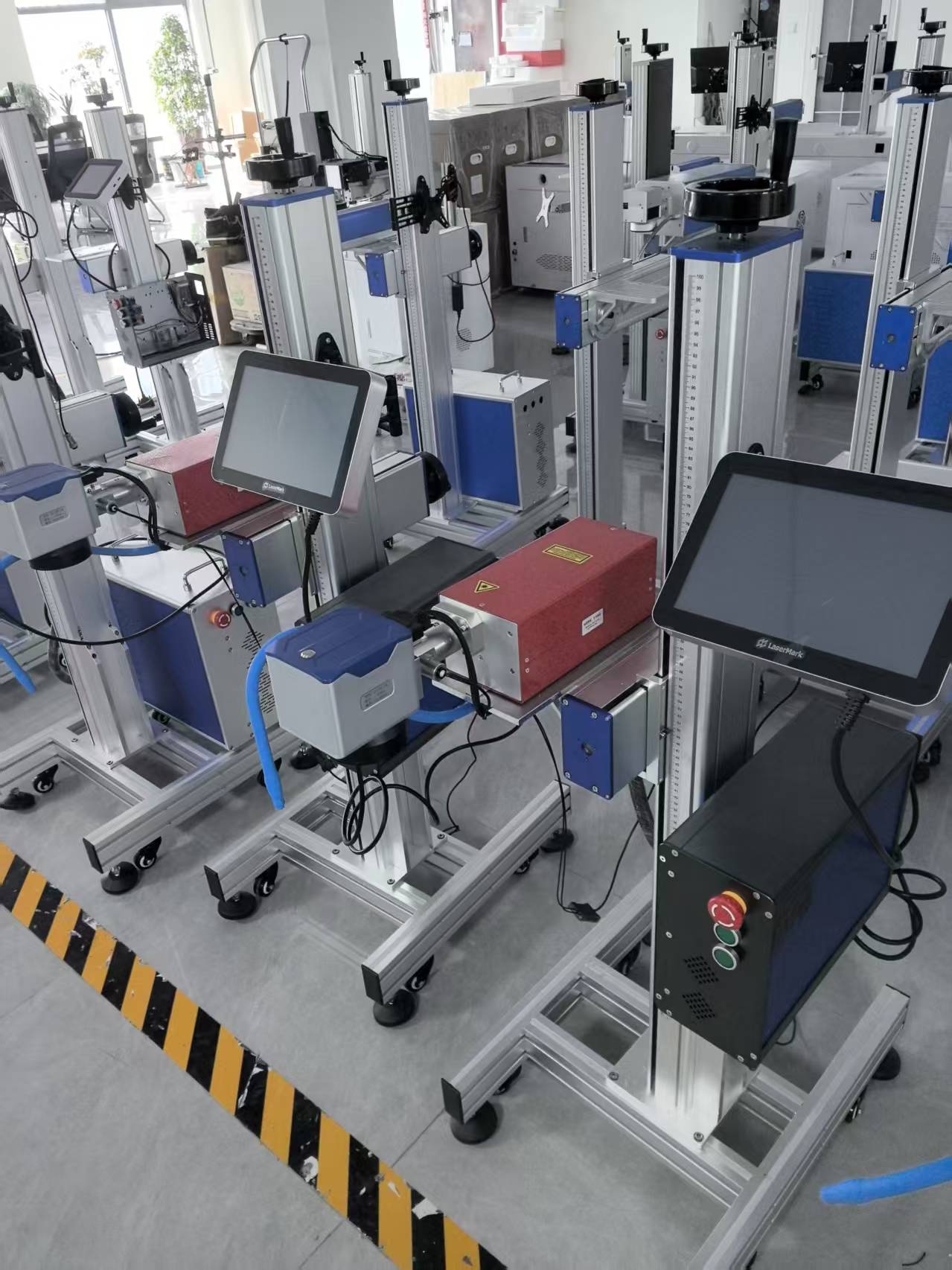
Industrial laser marking equipment production area. Software features such as font libraries and interface type are configured and tested before shipment.
Why software becomes the deciding factor in portable marking
Three software failures show up repeatedly in on-site marking, and all three are visible to the customer rather than to the machine supplier.
Font substitution. A logo supplied as an outline font is replaced by the nearest system font, and the marked part no longer matches the approved artwork. The laser performed correctly; the font library did not contain the character set.
Data handled off-machine. Every serial number or date code is typed into an external PC, exported, carried to the machine and reloaded. On a bench-top station this is tolerable. On a portable unit carried to a rack, a pipe joint or a loading bay, it erases the reason the machine is portable.
Codes that mark but do not scan. A QR code or barcode is produced with parameters that were never verified on the actual substrate, and the downstream traceability step fails at the scanner rather than at the laser.
The opportunity sits in the same place. When the font library, custom font handling, variable-data entry and file transfer are resolved on the machine itself, a portable marker behaves like a small marking station that happens to be movable — which is what most buyers in hardware, pipes and profiles, electronics, jewelry and mechanical spare parts are actually trying to purchase.
What the published specification documents
Software claims are only useful when they are traceable to a specification line. The table below separates what is documented from what remains a request to be confirmed in writing.
| Software element | Documented value | Where it is documented |
|---|---|---|
| Font library | 140+ font libraries | Desktop UV Laser Marking Machine specification |
| Custom fonts | Addable on request | Desktop UV Laser Marking Machine specification |
| Variable data | Logos, QR codes, barcodes, batch and date coding | Manufacturer application documentation |
| Control interface | Standard USB | Desktop UV, benchtop fiber, desktop fiber, CO2 and flying online platforms |
| Operating system (handheld) | Linux, 7-inch touch screen | Second-generation Handheld Fiber Laser Marking Machine |
| Connectivity (handheld) | Bluetooth, Wi-Fi, mobile app | Second-generation Handheld Fiber Laser Marking Machine |
| Marking area (handheld) | 110 mm × 110 mm | Second-generation Handheld Fiber Laser Marking Machine |
| Repeatability reference | ± 0.001 mm | Desktop fiber, benchtop fiber, UV and CO2 specifications |
Two points of discipline follow from that table. First, the 140+ font library and the standard USB control interface are documented on the desktop UV platform; a buyer ordering a handheld unit should ask the supplier to state, in writing, which software attributes carry over to the exact model on the purchase order. Second, “custom fonts addable on request” is a stated capability, not a catalogue item — the manufacturer notes that specific customization options and limits should be confirmed with sales, which means format, scope and lead time belong in the order documents rather than in an email assumption.
How a font library, a custom font file and a variable-data field interact
Font libraries: what 140+ entries change on the shop floor
Laser marking software generally distinguishes between single-line stroke fonts, which are fast to mark and produce clean narrow characters, and filled or outline fonts, which carry more visual weight but require more marking time and tighter parameter control. A library of 140+ entries reduces the amount of artwork conversion needed before a job runs and reduces the chance that a character is silently substituted. For a portable unit, where the operator is often standing at the workpiece rather than at a design workstation, that library is the difference between selecting a font and rebuilding one.
Custom fonts: a request process, not a checkbox
Custom font addition is documented as available on request. In practice this is a supplier-side configuration step with four checkpoints: the buyer supplies the font file; the supplier confirms format compatibility with the marking software; the supplier confirms whether the font becomes a permanent library entry on that machine; and both parties record the outcome in the order documents. Because the specification does not fix delivery time or format limits, a custom font requirement should be raised at the evaluation stage, not at commissioning.
Variable data: text, logos and barcodes are three different problems
A fixed logo is a geometry problem. A changing serial number or date code is a data-rule problem. A QR code or barcode is a verification problem, because symbology, module size, contrast and marking speed all affect whether the code scans after marking.
The manufacturer's application documentation covers all three: surface marking of logos, QR codes and barcodes, plus batch and date coding. The same documentation states, as manufacturer-reported results, 99.9% scanning accuracy for 2D QR codes and barcodes, micro-marking down to 10 microns (µm) with no thermal damage to heat-sensitive components, and permanent coding that withstands temperatures up to 1000°C. These figures describe the supplier's own application outcomes and should be re-verified on the buyer's substrate during sample marking, because substrate behaviour — not the software alone — determines the final scan rate.
The USB path: what standard USB does and does not cover
A standard USB control interface supports a simple, repeatable workflow: prepare the marking file on a PC, copy it to a USB device, load it on the marking machine, set power, speed and frequency for the substrate, preview the layout against the 110 mm × 110 mm field, and mark. Because the interface is documented as standard across the desktop UV, benchtop fiber, desktop fiber, CO2 and flying online platforms, a buyer running several of these units can keep one file-preparation routine across the floor.
The boundary matters as much as the capability. USB here describes file transfer and control, not production-system integration. No database, MES or ERP link is documented in the specifications reviewed for this article, so a buyer who needs automatic serial-number pulls from a production system must raise that requirement as a separate project and confirm feasibility with the supplier before committing to a line design.
Where these software capabilities fit: application scenarios
| Application | Which software feature carries the job |
|---|---|
| Hardware parts | A fixed brand logo plus a changing batch or date string; the font library keeps the logo stable while the variable field changes per lot. |
| Pipes and profiles, marked on site | On-machine data entry and a 7-inch touch screen avoid carrying a laptop to the joint; the 110 mm × 110 mm field must be planned per marking position. |
| Electronic components | Minimum character of 0.15 mm and micro-marking down to 10 µm on heat-sensitive parts, where the marking parameters, not the font, set the limit. |
| Jewelry and 3C accessories | Small-format platforms: the Miniature Multi-Material unit works within a 55 mm × 55 mm scanning area and weighs 2.7 kg, with TYPE-A data and TYPE-C power. |
| Mechanical spare parts | Serial numbers and QR codes for traceability, where scannability after marking is the acceptance criterion rather than visual appearance. |
| Gifts and crafts | Personalisation depends almost entirely on font access: multiple typefaces and a custom font route determine whether a one-off name or message can be marked without artwork preparation. |
| Large workpieces marked on site | A built-in lithium battery and Bluetooth, Wi-Fi and mobile app control remove the cable run; the marking field, not the software, defines how much can be done in one pass. |
Across these scenarios the same rule holds: the software decides whether a change is a five-second edit at the machine or a ten-minute detour to a PC. Buyers should test that specific motion during sample marking, using a real logo and a real serial number from their own production.
Market context: why marking software is moving up the specification list
The wider marking market gives the software question its commercial weight. Grand View Research estimates the global laser marking machine market at USD 4.4 billion in 2026, with fiber laser technology holding a 46.1% revenue share in 2025 and Asia Pacific accounting for approximately 44% of revenue in the same year. Portable and handheld units are typically quoted at 15 to 35 pounds, roughly 6.8 to 15.8 kg, a weight band that makes on-site marking practical but leaves little room for a separate design workstation in the workflow.
Two regulatory threads reinforce the same direction. Laser products sold in the United States must comply with FDA 21 CFR Subchapter J, Parts 1000 through 1005, and hand-held portable markers are assessed against EN ISO 11553-2 for hand-held safety in the EU and international context. As traceability requirements tighten, more of the marking content becomes variable — batch, date, serial, code — which shifts buyer attention from raw power toward how reliably the software handles changing data.
One honest gap is worth flagging. Public market sources do not break out the portable or handheld share of the laser marking market as a separate revenue figure, so segment forecasts should not be used to justify a software decision. Unit-level documented specifications — font library size, interface type, operating system, marking area — are the more defensible comparison base.
Portable software versus a fixed marking station: what buyers should expect
| Dimension | Fixed desktop station | Portable handheld unit |
|---|---|---|
| Marking area | 110 × 110 mm standard, with 150 × 150, 175 × 175 or 200 × 200 mm options on the desktop fiber platform | 110 × 110 mm |
| Software environment | Benchtop fiber platform documents Windows XP with a standard USB interface | Linux operating system with a 7-inch touch screen, plus Bluetooth, Wi-Fi and mobile app control |
| Workholding | Fixed fixture, repeatable positioning for high-volume batches | Operator-held or jig-assisted; positioning discipline moves to the operator |
| Reach | Workpiece must be brought to the machine | Machine is brought to the workpiece; built-in lithium battery removes the cable run |
| File preparation | Often done on the same PC attached to the machine | USB transfer or on-screen entry; complex artwork may still need preparation on a PC first |
Boundaries buyers should plan around. A handheld unit's 110 mm × 110 mm field is a physical constraint that no software setting removes: larger panels, long pipe runs or multi-position layouts require repositioning between marks. The on-machine Linux environment with a touch screen is built for job selection and variable-data entry, not for full graphic design, so artwork vectorisation and unusual logo reconstruction are still best handled on a PC before transfer. Custom font addition is a request-based process whose scope is confirmed with sales, so it carries a lead time. And the published specification reviewed here does not state runtime hours for the built-in lithium battery, which means shift coverage should be requested as a documented figure rather than assumed.
Future outlook
Software feature lists are becoming acceptance criteria rather than brochure detail. Three developments are likely to accelerate that shift: traceability regimes that push more variable data onto the part, mobile app control that shortens operator training on portable units, and procurement teams that ask for font library counts and interface types as numbered specification lines rather than marketing statements.
For suppliers, the practical consequence is documentation quality. A buyer comparing two portable marking machines can already distinguish them by asking four questions in sequence — how many fonts ship with the exact model, how a custom font is requested and confirmed, which variable-data elements the software handles natively, and which interface carries the job — and by requiring those answers to appear in the purchase order documentation.
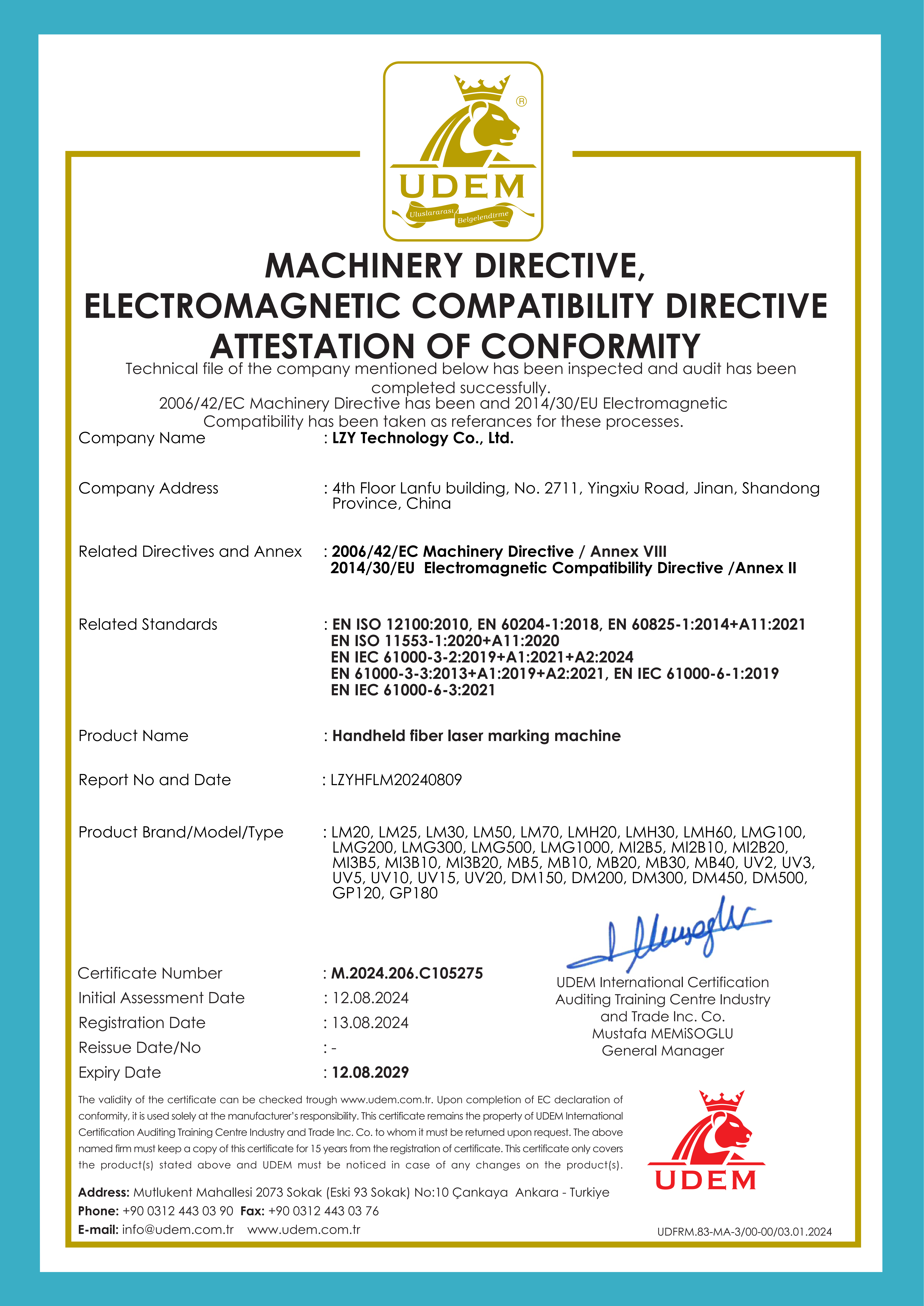
CE Declaration of Conformity M.2024.206.C105275, issued 12 August 2024 and valid to 12 August 2029 for the handheld fiber laser marking machine. Documented compliance files belong in the same verification pack as software specifications.
FAQ: portable laser marking machine software
Does a portable laser marking machine include a built-in font library?
Where the specification states it, yes. In the documentation reviewed for this article, the Desktop UV Laser Marking Machine lists 140+ font libraries as a software attribute, and the second-generation Handheld Fiber Laser Marking Machine lists a Linux operating system with a 7-inch touch screen for on-machine operation. Because the font count is documented per model rather than as a company-wide standard, the figure should be confirmed against the exact model on the purchase order.
Can custom fonts be added if the built-in library does not match our brand typeface?
Custom font addition is stated as available on request on the Desktop UV Laser Marking Machine specification. The process is supplier-side: the buyer supplies the font file, the supplier confirms format compatibility and scope, and the result is recorded in the order documents. The specification does not fix delivery time or format limitations, and the manufacturer states that specific customization options and limits should be confirmed with sales.
How does variable data marking work for text, logos and barcodes?
Variable data is handled inside the marking job rather than as a separate printing step. The manufacturer's application documentation describes surface marking of logos, QR codes and barcodes, plus batch and date coding. Logos are treated as fixed artwork, while text and codes change between parts. Manufacturer-reported application results include 99.9% scanning accuracy for 2D QR codes and barcodes, micro-marking down to 10 microns (µm) with no thermal damage to heat-sensitive components, and coding that withstands temperatures up to 1000°C. These figures should be re-verified on the buyer's own substrate during sample marking.
Which interface is used to transfer marking jobs to the machine?
Standard USB is the documented control interface on the Desktop UV Laser Marking Machine, and it also appears on the benchtop fiber, desktop fiber, CO2 and flying online platforms. The handheld unit adds a 7-inch touch screen, Bluetooth, Wi-Fi and mobile app control on top of its Linux operating system, which matters when a cable route to the workpiece is impractical. USB in this context describes file transfer and machine control; no database, MES or ERP integration is documented in the reviewed specifications.
What operating system does the marking software run on?
Documented platforms differ by model. The second-generation Handheld Fiber Laser Marking Machine runs Linux with a 7-inch touch screen, while the Benchtop Fiber Laser Marking Machine specification lists Windows XP with a standard USB interface. Buyers with IT security policies or standardised shop-floor software should therefore check the operating system on the exact model being ordered rather than assume a single platform across a supplier's range.
What software-related limits should be checked before ordering?
Four limits recur. The handheld marking area is 110 mm × 110 mm, so larger or multi-position layouts need repositioning between marks. Minimum character size on the reviewed platforms is 0.15 mm, which sets the floor for dense variable data. Custom font scope and lead time are confirmed with sales rather than fixed in the specification. And runtime hours for the built-in lithium battery are not stated in the published specification, so that figure should be requested in writing if shift coverage depends on it.
How can software and build claims be verified before shipment?
Verification runs through the acceptance process rather than through the brochure. All machines undergo aging tests and precision calibration before delivery, and acceptance inspection includes pre-shipment aging tests and precision calibration. Specific acceptance procedures — on-site acceptance, remote testing or third-party inspection — are negotiated and confirmed with the client. The minimum order quantity is 5 units, payment terms are deposit plus balance, and full English after-sales technical support is provided. Compliance files such as the CE Declaration of Conformity M.2024.206.C105275 (valid 12 August 2024 to 12 August 2029) and the FDA submission confirmation 2211928-000 under Title 21 CFR Part 1002 can be requested as part of the same documentation pack.
Verification path
For a buyer preparing a purchase order, the useful sequence is: confirm the font library figure and interface type for the exact model, submit one real logo and one real variable-data job for sample marking, verify the barcode with the plant's own scanner, and record the software attributes alongside marking area and power in the acceptance documentation. The manufacturer's specification brochure, including model parameters, can be downloaded here: Second-generation marking machine specification brochure (PDF).
Есть вопросы или нужны дополнительные детали?
Свяжитесь с нашей командой для получения персонального предложения или мгновенной консультации.
Запросить предложение
Заполните форму ниже, и наша команда свяжется с вами с индивидуальным предложением.
Прямой чат WhatsApp
Предпочитаете общаться в реальном времени? Напишите нам в WhatsApp для мгновенной помощи и быстрых ответов.
- Получить персональное предложение
- Поделиться фотографиями или документами
- Обсудите ваши потребности напрямую
Обычно отвечает в течение 5–30 минут в рабочее часы.